Personalise your Portflow
To make your Portflow portfolio truly unique, you can personalise it. You can do this by setting a banner image, for example, or by uploading an avatar. Everyone you invite to view your portfolio will see these settings.

Change the banner
To give the look of your Portflow a real boost, it is fun to set a banner image. If you need inspiration, you can use one of our suggestions.
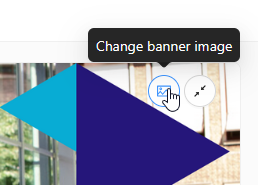
You set a banner image by going from DLO to Portflow, then navigating to 'My portfolio'. When you hover over the default banner, a 'Change banner image' button appears that lets you update the image.
Want to use one of our suggestions below? Click the image to download it and then upload it in Portflow.



Set an avatar
Your avatar is shown in several places in Portflow, for example when giving or receiving feedback. It is therefore nice to set a personal avatar. This can be a photo of yourself, or an image that represents you well.
You set an avatar by going from DLO to Portflow, then navigating to 'My portfolio'. When you hover over the default avatar, an 'Edit profile picture' button appears that lets you update the avatar.