Invite teachers
The portfolio you are building in Portflow is truly yours; fellow students or teachers cannot simply access it. To make sure your teachers do get access to your portfolio, you need to invite them . Do this at the start of the semester.
Invite teachers
To make sure teachers can always access your portfolio, invite them. Do this from the Portflow homepage with the 'Invite someone' button behind 'Shared with':

Your teacher(s) will tell you who you need to invite. These are often the teachers who will guide you in the coming period with collecting feedback and assessing your evidence. Without this invitation they cannot access your portfolio and therefore cannot help you.
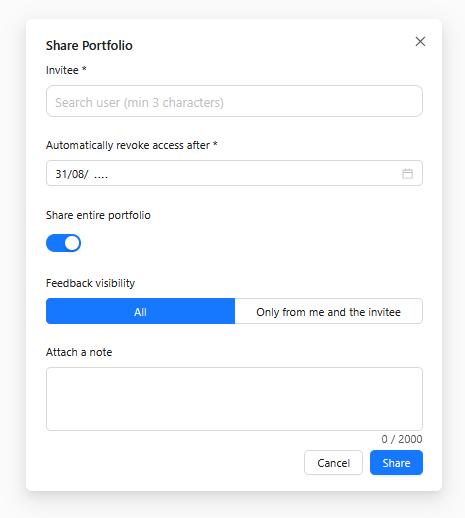
To share your portfolio you need to fill in the following details:
| Invitee | Enter the email address (or full name) of the teacher you want to invite. Tip: You can invite multiple people at once. |
| Automatically revoke access after | Click the input field; you will then get the option to choose 'academic year'. This ensures teachers still have access in case of a possible resit. |
| Share entire portfolio | Tick this so teachers have access to your full portfolio. |
| Feedback visibility | Tick this so teachers have access to all given feedback. |